
Introduction to Ryobi Router
A Ryobi router is a versatile woodworking tool used for trimming, shaping, and cutting wood with precision. Known for affordability, ease of use, and reliable performance, Ryobi routers are popular among DIY enthusiasts, hobbyists, and beginner woodworkers. They offer a range of features suitable for both small home projects and more advanced woodworking tasks.
Whether you’re building furniture, cabinets, or decorative pieces, understanding the Ryobi router and its capabilities will help you achieve professional-quality results.
Why Choose a Ryobi Router?
Ryobi routers stand out because they combine performance, affordability, and accessibility:
- Affordable: Ryobi routers are budget-friendly compared to professional-grade brands like DeWalt or Bosch.
- User-Friendly: Lightweight design and intuitive controls make them easy for beginners.
- Versatile: Many models can switch between fixed-base and plunge-base configurations, allowing a wide variety of woodworking techniques.
- Compatibility: Ryobi offers a range of router bits and accessories compatible with their routers for expanded functionality.
Fact: Ryobi is one of the leading power tool brands in North America, known for producing durable, cost-effective tools suitable for home and workshop use.
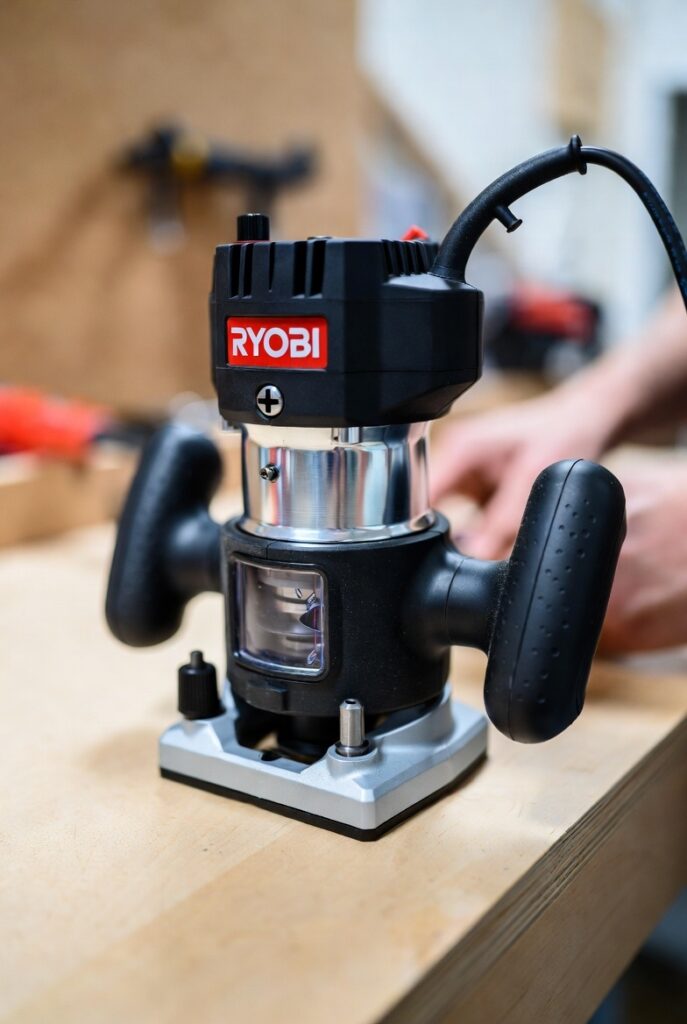
Types of Ryobi Routers
Ryobi routers are generally divided into two main types:
- Fixed-Base Ryobi Router:
- Designed for precise edge routing and consistent depth cuts
- Ideal for edge profiling, dado cuts, and template routing
- Easy to mount on a router table for stationary work
- Plunge-Base Ryobi Router:
- Allows the bit to be lowered into the wood from above
- Perfect for mortises, grooves, and intricate inlays
- Offers adjustable plunge depth for more complex cuts
Some Ryobi routers combine both fixed and plunge functionality, providing maximum flexibility for woodworkers.
Who Should Use a Ryobi Router?
- DIY Enthusiasts: Affordable and easy to learn, perfect for home projects.
- Hobbyist Woodworkers: Lightweight and versatile for crafting furniture or décor.
- Beginners: User-friendly design helps newcomers develop skills without a steep learning curve.
- Budget-Conscious Professionals: Provides solid performance for light-to-moderate use in workshops or job sites.
Summary: Introduction to Ryobi Router
The Ryobi router is a practical, cost-effective tool for anyone interested in woodworking. Its combination of versatility, affordability, and ease of use makes it an ideal choice for beginners and hobbyists. Understanding the types of Ryobi routers and their features is the first step in choosing the right model for your woodworking needs.
Key Features of Ryobi Routers
Ryobi routers offer a range of features designed to enhance precision, ease of use, and versatility. Whether you are a beginner or an experienced woodworker, understanding these features will help you make the most of your Ryobi router.
1. Motor Power and Speed Control
- Motor Power: Ryobi routers typically range from 1.25 HP to 2.25 HP, offering enough power for trimming, edge profiling, and moderate-duty woodworking tasks.
- Variable Speed Control: Many models allow users to adjust the router’s RPM from low to high. Lower speeds are ideal for larger bits or hardwood, while higher speeds work for softwood and smaller bits.
- Soft Start Feature: Some Ryobi routers include soft-start technology to prevent sudden torque, giving users better control during startup.
Example: The Ryobi R1631K features a 1.5 HP motor with variable speed, making it versatile for both light and medium-duty projects.
2. Base Type Options
- Fixed Base: Provides consistent depth and stability, ideal for edge work, straight cuts, and mounting on router tables.
- Plunge Base: Enables lowering the bit into the workpiece for grooves, mortises, and decorative cuts.
- Combo Base Kits: Some Ryobi routers come with both fixed and plunge bases, offering maximum flexibility for various woodworking tasks.
3. Depth Adjustment and Micro-Adjustments
Precision is key in routing, and Ryobi routers provide:
- Plunge Depth Adjustment: Allows precise control over how deep the bit cuts.
- Micro-Adjustment Rings: Fine-tune depth settings for highly accurate results.
- Locking Mechanisms: Keep the depth stable during long cuts or repetitive work.
Benefit: These features ensure clean, consistent results, especially when working on decorative edges or joinery.
4. Ergonomic Design and User Comfort
Ryobi routers are designed with user comfort in mind:
- Rubberized Handles: Reduce hand fatigue during prolonged use.
- Balanced Weight: Lightweight and easy to maneuver, even for beginners.
- Accessible Controls: Speed adjustment, power switches, and plunge locks are conveniently placed for smooth operation.
Fact: Ergonomic design improves both precision and safety, as users maintain better control over the router.
5. Dust Collection Compatibility
Many Ryobi routers feature dust ports or attachments compatible with vacuum systems. Effective dust collection:
- Keeps the work area clean
- Improves visibility of cut lines
- Reduces inhalation of fine sawdust, enhancing safety
Tip: Always connect a vacuum when performing extensive routing tasks to maintain a clean, healthy workspace.
6. Bit Compatibility and Versatility
Ryobi routers are compatible with a wide variety of router bits:
- 1/4-inch and 1/2-inch collets: Allow use of standard-sized bits for most woodworking tasks.
- Template Guides and Jigs: Many Ryobi models can attach to router tables, edge guides, or circle-cutting jigs for advanced projects.
- Accessory Support: Ryobi also offers specialty attachments like edge guides, straight guides, and dust hoods for expanded functionality.
7. Safety Features
Safety is a major consideration for Ryobi routers:
- Soft Start Motors: Prevent sudden jerks when powering on.
- Locking Plunge Mechanisms: Secure the bit at a set depth.
- Clear Base Plates: Improve visibility for precise routing.
- Overload Protection (on some models): Helps prevent motor burnout during extended use.
Summary: Key Features of Ryobi Routers
The Ryobi router combines power, precision, versatility, and safety. Key features like variable speed, base options, depth adjustments, ergonomic design, dust collection, and bit compatibility make Ryobi routers suitable for a wide range of woodworking projects — from beginner DIY tasks to more advanced home workshop work
Top Ryobi Router Models and Comparisons
Choosing the right Ryobi router depends on your woodworking needs, budget, and experience level. Below is a detailed overview of some of the top Ryobi router models, highlighting their features, pros, and ideal use cases.
1. Ryobi R1631K 1.5 HP Router
Overview:
The Ryobi R1631K is a popular choice for home workshops and DIY enthusiasts. It features a 1.5 HP motor and a variable speed range of 10,000 to 25,000 RPM, making it versatile for a wide range of woodworking projects.
Key Features:
- Variable speed control for precision routing
- Fixed-base design with optional plunge attachment
- Micro-adjustment ring for precise depth control
- Dust collection port for cleaner work
- Ergonomic handles for comfortable use
Pros:
- Affordable and reliable
- Suitable for both edge work and moderate-duty cutting
- Compatible with standard 1/4″ and 1/2″ bits
Cons:
- Lacks some advanced features found in professional-grade routers
- Heavier than smaller compact models
Ideal For: Hobbyists, DIYers, and small home projects
2. Ryobi R163LR 1.5 HP Plunge Router
Overview:
The R163LR is the plunge version of the R1631K, offering flexibility for grooves, mortises, and template routing. Its adjustable plunge depth allows precise control for intricate woodworking.
Key Features:
- 1.5 HP motor with variable speed control
- Plunge-base design for versatility
- Micro-adjustment ring for fine depth control
- Dust collection port compatible with standard vacuums
- Rubberized ergonomic handles
Pros:
- Allows both edge and plunge cuts
- Smooth and accurate plunge mechanism
- Easy depth adjustment
Cons:
- Slightly higher price than fixed-base models
- Requires some experience for complex plunge cuts
Ideal For: Users needing both edge work and plunge capabilities
3. Ryobi R163LRG 2 HP Combo Router Kit
Overview:
The R163LRG is a combo kit that includes both fixed and plunge bases, providing maximum versatility. Its 2 HP motor offers slightly more power for heavier-duty tasks.
Key Features:
- Dual base system (fixed and plunge)
- 2 HP motor with variable speed
- Depth adjustment and micro-adjustment rings
- Dust collection port and ergonomic design
- Includes starter set of router bits
Pros:
- Combines two routers in one
- Powerful motor for a variety of wood types
- Excellent for DIY projects and small professional work
Cons:
- Larger and heavier, may require more storage space
- Higher cost compared to single-base models
Ideal For: Woodworkers seeking flexibility and moderate professional use
4. Comparison Table of Top Ryobi Routers
| Model | Motor | Base Type | Variable Speed | Dust Collection | Best For |
|---|---|---|---|---|---|
| R1631K | 1.5 HP | Fixed | Yes (10–25k RPM) | Yes | DIY & hobbyists |
| R163LR | 1.5 HP | Plunge | Yes (10–25k RPM) | Yes | Plunge & groove cuts |
| R163LRG Combo | 2 HP | Fixed + Plunge | Yes (10–25k RPM) | Yes | Versatile, small professional |
5. How to Choose the Right Ryobi Router
When selecting a Ryobi router, consider:
- Type of Projects: Simple edge work vs. intricate plunge cuts
- Experience Level: Beginners may prefer fixed-base models, while experienced woodworkers benefit from combo kits
- Budget: Fixed-base models are more affordable; combo kits offer more versatility at a higher price
- Workspace: Larger combo kits require more storage and setup space
- Motor Power Needs: Higher HP for hardwoods or heavier-duty tasks
Pro Tip: If you are unsure, starting with a fixed-base Ryobi router and adding a plunge kit later can be a cost-effective strategy.
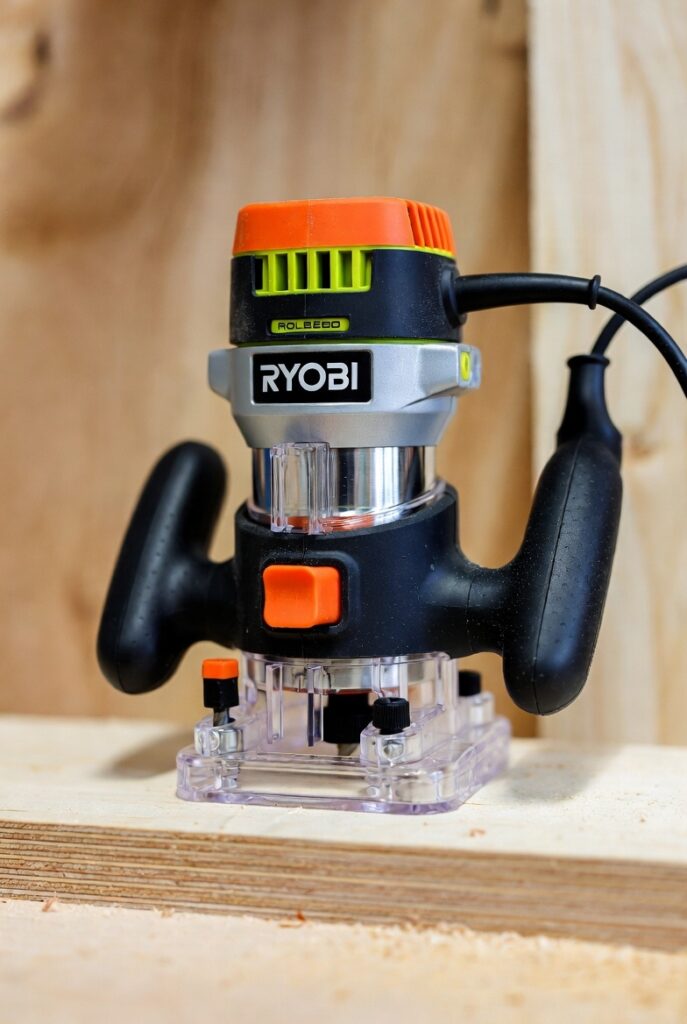
Summary: Top Ryobi Router Models
Ryobi offers a range of routers suitable for beginners, hobbyists, and moderate professional use. From the reliable R1631K fixed-base to the versatile R163LRG combo kit, each model provides variable speed, ergonomic design, and dust management, making them ideal for a wide variety of woodworking projects. Choosing the right model depends on project type, skill level, and budget.
How to Use a Ryobi Router Effectively
A Ryobi router is a versatile tool capable of producing clean, professional-quality cuts, but mastering it requires understanding its operation, safety precautions, and techniques. Proper use ensures both precision and safety.
1. Essential Safety Gear
Before using your Ryobi router, make sure you have:
- Safety Glasses: Protect eyes from flying wood chips
- Hearing Protection: Routers can be loud, especially during prolonged use
- Dust Mask: Fine sawdust is hazardous when inhaled
- Secure Clothing: Avoid loose sleeves or jewelry that may get caught in the router
Pro Tip: Good lighting and a clear workspace reduce mistakes and enhance safety.
2. Preparing Your Workpiece
Proper preparation prevents errors and ensures clean cuts:
- Clamp the Wood: Secure the workpiece with clamps to prevent movement
- Mark the Cut: Use a pencil, ruler, or template to outline your routing path
- Check the Bit: Ensure your router bit is sharp, clean, and properly tightened
Example: For edge profiling, mark the desired shape clearly to guide the router along a smooth line.
3. Setting Up the Ryobi Router
- Install the Bit: Insert the bit into the collet and tighten securely
- Adjust Depth: Use the depth adjustment knob or plunge mechanism for precise cutting
- Set Speed: Adjust the router speed depending on bit size and wood type; lower RPM for large bits or hardwood, higher RPM for softwood and small bits
- Check Stability: Ensure the router base sits flat on the workpiece and handles are secure
Pro Tip: For deeper cuts, make multiple shallow passes rather than trying to cut all at once.
4. Router Operation Techniques
- Start Above the Workpiece: Ensure the bit isn’t engaged when placing the router on wood
- Plunge Smoothly (for Plunge Base): Press the router down slowly and lock the depth once reached
- Move Steadily: Guide the router along the cut line without forcing it
- Feed Against Bit Rotation: This ensures smoother cuts and reduces tear-out
Tip: Maintain both hands on the router handles for maximum control and safety.
5. Using Guides and Templates
- Router Fences: Ideal for straight, repeatable cuts
- Edge Guides: Maintain parallel cuts along edges
- Templates and Jigs: Enable precise shapes, mortises, or circular cuts
Example: Using a circle-cutting jig with a Ryobi router allows perfect round tabletops or decorative inserts.
6. Maintenance Tips for Ryobi Routers
- Clean dust from vents and base regularly
- Lubricate plunge posts for smooth operation
- Inspect bits and collets for wear
- Store the router in a dry, safe location to prevent damage
Regular maintenance keeps your Ryobi router performing reliably and prolongs its lifespan.
7. Common Mistakes to Avoid
- Forcing the router through wood
- Plunging too deep in one pass
- Using dull bits
- Ignoring dust collection
- Skipping safety gear
Correcting these mistakes improves both cut quality and safety.
Summary: Mastering the Ryobi Router
Effectively using a Ryobi router combines safety, preparation, proper setup, and technique. By:
- Wearing safety gear
- Securing and marking your workpiece
- Adjusting depth and speed properly
- Using guides, fences, and jigs
- Performing regular maintenance
…you can achieve precise, professional-quality results on every woodworking project.
Tips for Choosing the Right Ryobi Router for Your Needs
Selecting the right Ryobi router can make a significant difference in both project quality and ease of use. Here’s a guide to help you make an informed choice based on your skill level, project type, and workspace.
1. Consider the Type of Projects You’ll Be Doing
Different routers are better suited for specific tasks:
- Edge Work: Fixed-base routers are ideal for consistent depth cuts along edges.
- Grooves and Mortises: Plunge-base routers allow precise vertical cuts and inlays.
- Versatility: Combo kits with both fixed and plunge bases are great for hobbyists who want maximum flexibility.
Tip: If you primarily do edge work, a fixed-base Ryobi router may suffice. If you plan to do a variety of cuts, consider a plunge or combo kit.
2. Motor Power Requirements
Motor strength affects the router’s ability to cut through different wood types:
- 1.25–1.5 HP: Suitable for light-duty tasks like trim work, softwood, and DIY projects
- 1.5–2 HP: Handles moderate-duty tasks, including hardwood and medium-sized cuts
- 2+ HP: Best for professional or heavy-duty applications
Pro Tip: Don’t overpay for a high-powered router if your projects are mostly light DIY work.
3. Base Type Options
- Fixed Base: Best for beginners and straightforward cuts
- Plunge Base: Required for mortises, grooves, and intricate designs
- Combo Kits: Offers the most versatility but may be heavier and more expensive
Consider your workspace and storage — combo kits take more room but provide maximum flexibility.
4. Variable Speed Control
- Softwood & Small Bits: Use higher speeds
- Hardwood & Large Bits: Use lower speeds to prevent burning and tear-out
- Adjustable Speed: Look for models with variable speed to adapt to different projects
Example: The Ryobi R163LRG combo kit provides variable speed control, allowing precise adjustment for diverse woodworking tasks.
5. Accessories and Compatibility
Check if the router is compatible with:
- Standard 1/4” and 1/2” bits
- Router tables, fences, and guides
- Dust collection systems
Using compatible accessories improves precision, safety, and efficiency.
6. Budget Considerations
Ryobi routers range from affordable entry-level models to mid-range combo kits:
- Entry-Level: Fixed-base models, ~$80–$120
- Mid-Range: Plunge routers or combo kits, ~$150–$250
- High-End: Enhanced combo kits with extra accessories, ~$250+
Pro Tip: Choose a router that fits both your budget and your expected project workload. Investing slightly more in a combo kit can save money in the long term if your projects grow in complexity.
7. Ergonomics and Ease of Use
- Handle Design: Rubberized grips reduce fatigue
- Weight: Lightweight models are easier for beginners to control
- Control Placement: Easy-to-access speed and depth adjustments improve efficiency
A router that feels comfortable will allow for more precise cuts and longer work sessions without fatigue.
Summary: Choosing the Right Ryobi Router
Selecting the right Ryobi router involves balancing:
- Project type (edge vs. plunge vs. combo)
- Motor power (light, moderate, or heavy-duty)
- Base type and versatility
- Variable speed control
- Compatibility with bits and accessories
- Budget and ergonomic preferences
By evaluating these factors, you can choose a Ryobi router that matches your woodworking needs, skill level, and workspace, ensuring both satisfaction and high-quality results in your projects.